
From Laid Off to Logged On:How I Used A.I. to Find My Niche & Build a Website - Starting a Small Business in Half the Time
A practical, honest, and occasionally ridiculous guide to launching your creative brand, Finding a Niche, and buidling your website with a.i. - featuring a full 2026 platform comparison, real A.I. workflows, and the three Squarespace resources that compressed years of learning into weeks.
By M.E. | Elemental Vibes | Web Design & Branding | ~12–14 min read The Day I Realized I'd Been Hiding My Superpower
Let me set the scene. It is a Tuesday — or possibly a Thursday, honestly the days blur together after a layoff — and I am sitting at my craft table surrounded by hand-burned hats, half-finished jewelry, and enough tie-dye to redecorate a small nation. I have the creative energy of someone who just discovered espresso. I have the business clarity of someone who has had approximately none. And there is a question hanging in the air, unanswered and increasingly irritating: what exactly IS this business?
Grab yourself a Lavender Starbucks or your favorite drink, get comfortable, and let’s vibe . . .
Here is the thing about being a multi-passionate creative: you do not have a niche problem. You have an everything problem. Jewelry? Yes. Hats with hand-burned artistic designs? Absolutely. Tie-dye in patterns vibrant enough to stop traffic? Obviously. Upcycled thrifted furniture transformed to artisan perfection? You know it. The products were real, the craftsmanship was solid, and the vision — while slightly blurry around the edges — was very much present. But without a clear identity, without a story that connected all of it, the world would see an enthusiastic person selling very different things. And the world, as it turns out, prefers a story.
I had been down the Google rabbit holes. I had journaled. I had made lists. I had asked friends who gave me the enthusiastic-but-vague support that only good friends can deliver. And then, finally, in a moment of pure "why not," I turned to Artificial Intelligence — and the fog started lifting. Fast.
This post is the full account. How A.I. helped me find and name my brand niche — and the five directions it surfaced that I genuinely could not argue with. How I compared five website platforms and landed on Squarespace with a coupon code and zero regrets. How the platform's own A.I. tools turned a reluctant skeptic into a full convert. And the three Squarespace creators whose content has fast-tracked my growth from "nervous returner" to confident web designer in a matter of weeks. If you are starting over, pivoting hard, or simply trying to figure out how to turn creative talent into a real, functioning business — this is the post I wish I had found first.
This post is for anyone who has ever stared at a blank screen and thought: I know I have something here. I just don't know what to call it yet. -M.E. ~ Elemental Vibes
Step One: Using A.I. to Find My Niche — Because Google Wasn't Cutting It
The Problem With Being Good at Too Many Things
Nobody warns you about this particular flavor of creative paralysis. When you are genuinely skilled across multiple disciplines — jewelry, wearables, home goods, furniture, software, design — choosing a single niche feels like choosing a favorite child. You resist it. You rationalize why you need all of it. You spend a significant amount of time building a very full creative life with very little business direction to show for it.
I had been spinning on this question for longer than I care to admit. Every time I tried to pin down a direction, another product idea surfaced, another area of expertise reminded me it existed, and I was back at the beginning with a fresh mood board and the same unresolved question. The traditional methods — journaling, Google research, asking friends — were producing encouragement without clarity. I needed something different.
What Happened When I Finally Asked A.I.
My approach was straightforward: I described everything. The products, the aesthetic, the values that kept surfacing — sustainability, artisan quality, bold self-expression, the slow fashion mindset. The software and design background I had spent years underusing. The customer I kept picturing. The feeling I wanted the brand to create. Then I asked A.I. to identify the niche directions that could unify it all under one coherent identity.
What came back was a list that stopped me mid-scroll. Not because any single suggestion was a shock, but because each one reflected something I was already doing or already credentialed to do — I had just never organized it into a strategy. After careful consideration of which niches aligned most tightly with my skills, my products, and the business I actually wanted to build, five rose clearly to the top:
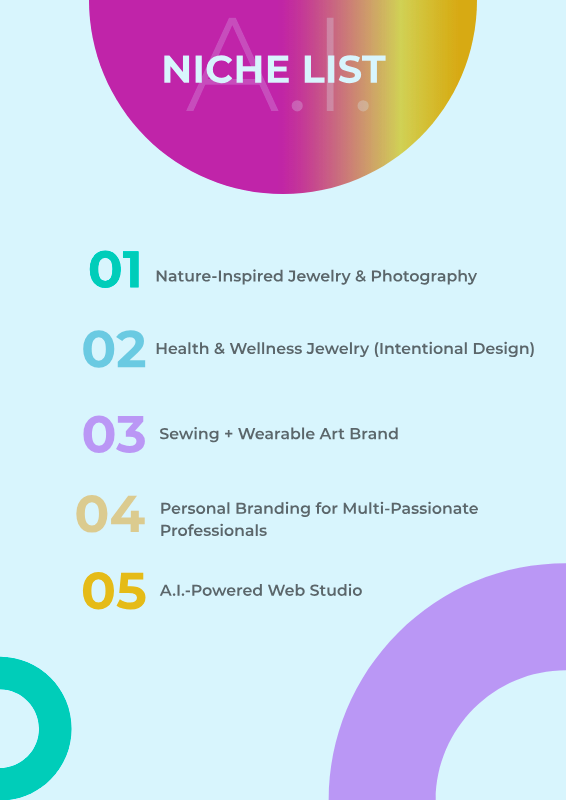
A.I. didn't invent these directions. It organized what was already there — the skills, the products, the instincts — and handed it back with a clarity that months of journaling never quite produced.
M.E. ~ Elemental Vibes
Why These Five and Not the Others
Every niche on the full list had merit — and full transparency, the complete list was significantly longer. But the five above share something important: they each sit at the intersection of what already exists in the business and what the market genuinely wants. They are not aspirational pivots into unfamiliar territory. They are the existing work, the existing credentials, and the existing aesthetic — finally organized into something a customer can understand and a business can build around.
The broader takeaway for anyone working through their own niche question: stop asking "what should I do?" and start asking "what am I already doing that the market would pay for?" A.I. is remarkably good at helping you answer the second question, if you give it enough honest detail to work with.
The Great Platform Showdown: Five Contenders, One Winner, Zero Regrets
Why This Decision Feels So Much Bigger Than It Should
Once the niche question was answered, the next challenge arrived immediately: the website. If the goal was to reach beyond the geographic radius of a wonderfully small town, an online presence was non-negotiable. And the number of platforms competing for that business made the decision feel far more consequential than it probably needed to be.
Every option had passionate advocates. Every option had cautionary tales. Every comparison article seemed to have been written by someone with a financial stake in the outcome. What was missing was a straightforward, honest breakdown from someone who had recently gone through the comparison process without an agenda. Consider this that breakdown.
2026 Platform Comparison — The Numbers Side by Side
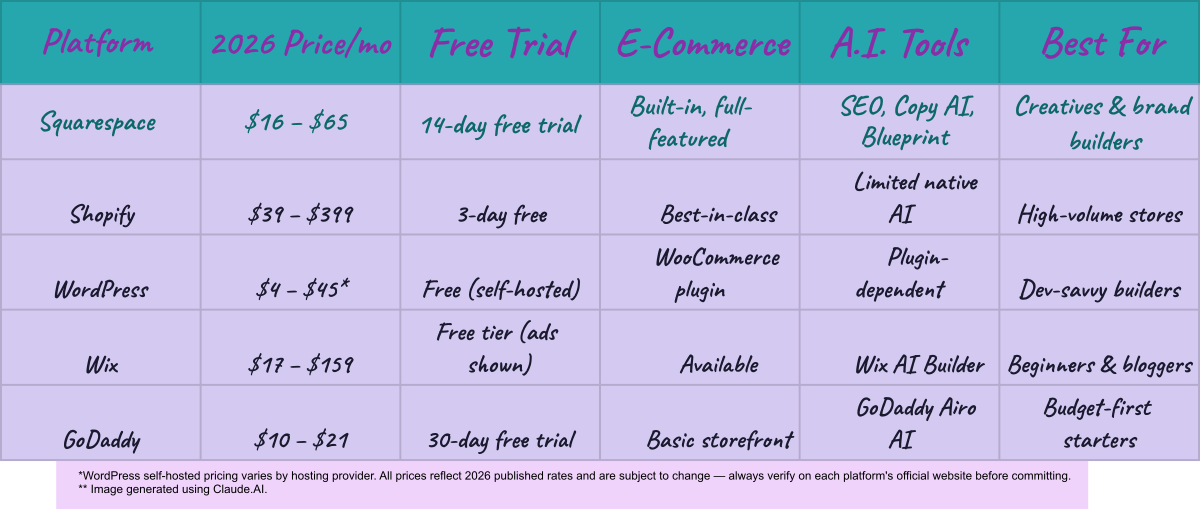
The Honest Take on Each Platform
Shopify
Shopify is the undisputed heavyweight of pure e-commerce. For high-volume stores with complex inventory, multi-channel selling, and serious scalability, Shopify is genuinely built for the job. The keyword is "high-volume." For a solopreneur building from the ground up, the monthly fees climb quickly before you have even started adding the integrations that make it perform at the level it promises. Think of Shopify as a sports car: brilliant engineering, more power than most people need for the school run.
WordPress
WordPress gives you maximum flexibility and control — and charges you for that freedom in technical complexity and ongoing maintenance. Developer-savvy builders with the skills or budget to manage it will find WordPress endlessly capable. Creative entrepreneurs who would rather be making products than debugging plugin conflicts at midnight should proceed thoughtfully. The entry-level self-hosted pricing is genuinely accessible, and for someone with the technical appetite, it remains one of the most powerful platforms available.
Wix
Wix has improved significantly and deserves more credit than it typically receives. The AI website builder has evolved into a useful tool for getting a presentable site live quickly, and the free tier — despite the ads — is a legitimate way to test before committing financially. Where Wix falls short for design-forward brands is the visual ceiling: the template aesthetic leans more functional than editorial. If speed matters more than polish, Wix delivers. If your brand lives by its visual identity, you may find yourself wanting more.
GoDaddy
GoDaddy's website builder has come a long way, and the GoDaddy Airo AI tool is useful for getting a basic presence up fast. The pricing is among the most accessible in the market, which makes it a solid starting point for businesses that need an online home without heavy visual requirements. For a brand where the aesthetic IS the product — where design is the differentiator — the customization ceiling becomes apparent quickly.
⭐ Squarespace — And Why It Won
Here is where I stop being diplomatic. For a creative brand — and specifically for the intersection of artisan products, visual storytelling, and web design services that Elemental Vibes represents — Squarespace operates in a different category. The templates are not just "good for a website builder" beautiful. They are genuinely editorial. The fluid engine makes drag-and-drop design feel intentional rather than assembled. The Square payment integration was immediate and seamless. And the combination of a sale and a coupon code at exactly the right moment? The universe was clearly on board.
But the templates were only the beginning. What made Squarespace a conviction rather than just a comfortable choice was what was waiting inside the platform — and that is where A.I. entered the picture for the second time.

“The best platform is not the most powerful one. It is the one you will actually use, consistently and confidently, without calling your most tech-savvy friend at two in the morning.
~M.E. @ Elemental Vibes
Inside Squarespace: Where A.I. Went From Curiosity to Conviction
A Confession About My First Prompts
I want to be upfront: I did not arrive at A.I. as a confident early adopter. I arrived somewhere between anxious and curious — the way you feel before trying something that might be either brilliant or a complete waste of an afternoon. I was teetering, genuinely, between leaning in and staying safely on the sidelines. The turning point was permission. I gave myself permission to try it badly first. That made all the difference.
My first prompts were spectacularly basic. I was, by my own admission, essentially treating A.I. like a slightly more sophisticated Alexa. "Write a description for handmade jewelry." "Suggest a tagline for an artisan brand." The results were better than my prompts deserved, which was simultaneously humbling and encouraging. As I learned to prompt with more specificity — more context, more detail, more genuine intention — the outputs started becoming genuinely impressive. The writing sounded professional. The SEO language was natural. The descriptions, pitches, and blurbs that used to drain my mental energy were appearing in seconds.
The Squarespace A.I. Features That Actually Delivered
Within Squarespace specifically, the A.I. tools I found most immediately useful were the SEO enhancement features and the copy-editing capabilities for product descriptions, pitches, and website blurbs. If you have ever tried to write compelling copy for fifteen different product listings at the end of a long creative day, you understand why this matters. The words that emerge from a tired brain at that point are not the words that convert visitors into buyers. The words A.I. helps you shape and refine? Those do the job.
The A.I.-driven fluid engine was its own revelation. Building a website that looks genuinely designed — rather than assembled — has historically required significant code knowledge or budget to hire someone who had it. Squarespace's fluid engine flattens that curve in a way that still surprises me. After a few hours of learning the tool, I was producing pages that looked like they came from a design studio. For a business where the website IS part of the brand identity, that is not a small advantage. It is the whole game.
The vast array of fonts, color palettes, and animations — image overlays, word-scrolling effects, dynamic transitions — all available without writing a single line of code. And for those who are code-curious? Even a little CSS opens the door to customization that makes a Squarespace site feel distinctively, unmistakably yours. Which leads directly to the part of this post I have been most excited to share.
I didn't know much about prompts, so my first ones were very minimalistic — almost as if I was treating A.I. like Alexa. But I soon came to learn the true capabilities of A.I., and I have not looked back since.
The Three Squarespace Resources That Deserve Their Own Fan Club
Here is something the platform tutorials do not tell you: the tools are only half the equation. The other half is finding creators who have already spent years figuring out the tricks, the workarounds, and the features that make the difference between a website that looks built and a website that looks designed. I found three of them. They have earned permanent, non-negotiable spots in my browser and in this post.
1. Paige Brunton — The Resource That Started Everything
The entry point was a video titled 51 Squarespace Lessons I Wish I Knew Sooner. A title perfectly engineered for someone in my exact situation — I clicked it in under a second, fully prepared for it to deliver on perhaps a third of its promise. It delivered on all of it. Twenty minutes later I was taking notes. An hour later I was three videos deep and completely absorbed. Paige Brunton had my full and undivided attention.
What Paige does exceptionally well is make Squarespace feel approachable without making it feel simplified. She has been doing this for years, and the experience shows as confidence rather than condescension — the specific ease of someone who has already made every mistake so you do not have to. Her advice on moving an e-commerce website from functional to genuinely beautiful, without writing a line of code, is practical, specific, and immediately actionable.
The natural next step was enrolling in her 5-Day Dream Client Blueprint. The Canasta reserves were monitored closely, the investment was made, and it was absolutely worth it. The course delivers exactly what it promises: a clear, focused strategy for attracting and booking the clients you actually want. But the deeper impact was something I had not anticipated. Five days in, I had a portfolio direction, a clearer professional identity, and — critically — the ability to call myself a web designer without the mental * asterisk I had been quietly adding every single time.
It was the push I needed to start my web design portfolio and to take this new path seriously. Here I am — five days in, with confidence, a mission, and a vision. And I am sticking to it.
-M.E. ~ Elemental Vibes
2. Inside the Square with Becca Harapin — The CSS Nerd Who Saved My Sanity
Every Squarespace journey eventually hits a wall. Mine had a very specific address: I wanted to change the font of a single word inside a sentence. One word. The surrounding text could stay exactly as it was. Just. One. Word. And Squarespace's default behavior — applying font changes to the entire text block — had decided this was not going to happen without a fight.
The search for a solution led directly to Becca Harapin and the Inside the Square community, specifically her video 25 Squarespace Tips: The Ultimate Squarespace Guide for 2025. Yes, we are in 2026 now — but barely, and the content is absolutely still a gold mine. Some things age like fine wine. The Nerd of All Nerds. The queen of CSS. The woman who has built an entire thriving community around making Squarespace do things it did not think it could do.
Becca explains custom code in a way that feels like unlocking a superpower rather than studying a foreign language. Her Squarespace CSS Cheat Sheet is a comprehensive, practical resource that belongs in every Squarespace designer's toolkit — whether you are a complete beginner who has never written CSS or a returning developer dusting off skills after a long hiatus. And the learning does not stop at the code itself. The community around Inside the Square carries that same energy I recognized immediately as my own, providing exactly the collaborative, judgment-free support that makes the technical side of web design feel far less solitary — and far more fun. Perhaps the greatest gift Becca has given me, though, has nothing to do with CSS at all. She challenged me to blog at least once a week for three months straight. So here I am, keyboard in hand, challenge very much accepted. You have been warned.
Changing font for Individual Words in a Sentence without code:
1. Open a text block and enter your sentence in one font style (Paragraph 2 for example).
2. Open a second text block using a different font style (Heading for example). Type the word(s) you want changed in text 2. Highlight the word(s) you want to replace in text 1 and paste the text.
For the record: I did eventually solve the single-word font problem through my own Squarespace experimentation — a clever two-text-box method requiring absolutely no code. That trick is shared with you here, where it will be waiting whenever you need it.
3. Studio La Terre — The Trendsetter Who Made My Brain Explode
I was deep in a 2026 web design trends session when Studio La Terre appeared in my recommendations like a perfectly timed gift. The video was Next-Level Squarespace Effects [Typewriter, Liquid Glass, Custom Cursor + More] — and within the first two minutes, I watched a spinning egg rotate smoothly as a user scrolled down the page. I watched that section three times in a row with the expression of someone who has witnessed a very good magic trick and absolutely needs to know how it is done.
Studio La Terre works fluently across CSS, HTML, and JavaScript to create web experiences that feel custom-coded, editorially refined, and visually arresting — the kind of website templates that make visitors slow down and actually look, like this Glow Getters template or this Luxe Salon template that certainly got my attention at first sight. The liquid glass effect, overlapping sticky blocks, scroll-triggered animations, the custom cursor feature: if it is a 2026 web design trend worth knowing, she is teaching it with clarity, generosity, and obvious mastery.
What Studio La Terre gave me beyond the specific techniques was the "you never forget how to ride a bike" moment I had been waiting for. Skills filed away years ago came back faster than expected. HTML and JavaScript syntax that had felt rusty started feeling familiar again. Not only did I implement the scroll-triggered rotation and the liquid glass effect on my own site — I did it with confidence, because she had shown exactly how it was done.
Here is how the complete resource framework maps out — and it is worth naming explicitly because it is also a framework for how to structure tiered web design services:
Paige Brunton — No-code Squarespace design plus business strategy. The confidence anchor, the blueprint, and the "you can absolutely do this" voice when you need it most.
Becca Harapin (Inside the Square) — CSS code for Squarespace, explained accessibly with community support and a cheat sheet worth bookmarking permanently.
Studio La Terre — CSS, HTML, and JavaScript for next-level Squarespace effects. The definitive 2026 web trend authority.
Together, these three cover every tier of the Squarespace design spectrum — from zero-code builds for budget-conscious clients to fully custom-coded experiences for clients who want something truly distinct. Having command of all three tiers means being able to offer tiered pricing across the full range of client needs. That is a business advantage that emerged from a YouTube rabbit hole, and I am not complaining about it for even a second.
~M.E @ Elemental Vibes
Having these resources allows me to offer tiered website design pricing depending on client needs and budget. More importantly, it gives me the confidence to do something with myself, for myself — and that is the part nobody talks about enough.
The Bottom Line: You Are Not Starting From Zero
Here is what I need you to hear, particularly if you are somewhere in the middle of your own version of this story: you are not starting from zero. You have skills you have underestimated, instincts you have second-guessed, and creative energy you have probably been channeling into structures that were never quite right for it. The layoff, the career pivot, the "now what" moment — these are not setbacks. They are redirects.
A.I. helped me see clearly what I had already been building. It surfaced five niche directions that were genuinely, specifically mine — not generic suggestions, but a mirror held up to the work I was already doing and the credentials I had stopped counting. Squarespace gave me a canvas worthy of the vision and tools that made building feel like creating rather than just assembling. Three generous, genuinely talented creators lit the technical path forward. And somewhere in the middle of all of it, I stopped being someone who "used to" make websites and started being someone who makes them — present tense, no asterisk, no qualifier.

~M.E @ Elemental Vibes
Why had I not realized my connection to website design and my bottled-up creativity sooner? It doesn't matter anymore. What matters is that I realize it now — and I am running with it, full speed, no looking back.
If I could distill everything in this post into three starting points, it would be these:
Use A.I. to define your niche before you build anything. Describe your work, your values, your credentials, and your ideal customer in honest detail — then let A.I. reflect it back organized and named. The five directions that rise to the top will tell you exactly where to start. (See my last blog for ideas on writing your own A.I. prompt for finding your niche).
Choose your platform deliberately, not reactively. Use the comparison chart as a starting point, but ultimately ask: which platform am I most likely to actually open and use every day without friction? Consistency will always outperform raw capability.
Find your resource people and invest in them. The right mentors — free YouTube content or a paid course — compress your learning curve dramatically. Find the creators whose energy matches yours, whose skill level challenges you without overwhelming you, and whose generosity with knowledge feels genuine. Then go all in.
The niche is real. The website is live (although it is getting it’s BBL). The shop is growing. The brand is finding its voice. And whoever you are reading this — whether you are three weeks into a pivot or three years into a career that never quite fit — I hope this post gives you permission to trust what you have already built and start building forward from here.
Now It's Your Turn — Drop Into the Comments ✨
Out of the five niche directions A.I. surfaced for Elemental Vibes — Nature-Inspired Jewelry & Photography, Health & Wellness Jewelry, Sewing + Wearable Art Brand, Personal Branding for Multi-Passionate Professionals, and A.I.-Powered Web Studio — which one resonates with you most? I read every single comment and your answer might genuinely influence where the brand goes next.
And if this post gave you one useful idea, one moment of recognition, or even just a laugh at the hand-burned hats and tie-dye situation — share it. There are creative people everywhere sitting on untapped superpowers, waiting for permission to use them. Be the person who forwards this to someone who needs to read it today.
📬 Subscribe for weekly posts on web design, branding, and the unfiltered reality of building a creative business from scratch.
🛒 Shop Elemental Vibesfor handcrafted jewelry, hats, home goods, and upcycled furniture made with genuine intention and artisan craft.
☕ And if Paige, Becca, or Studio La Terre have helped you on your own Squarespace journey — go donate to their coffee and margarita funds. Sign up for their newsletters. Take their courses. They have absolutely earned it.
This page contains affiliate links. I may earn commissions from sales and my lavender lemon drop martini fund thank you!
